How to Sell an Old TV Online: Screen Photos, Accounts and Pickup
Show the model, screen condition and included parts clearly. Prepare a useful demonstration, remove personal accounts and agree careful TV collection.

Content Writer
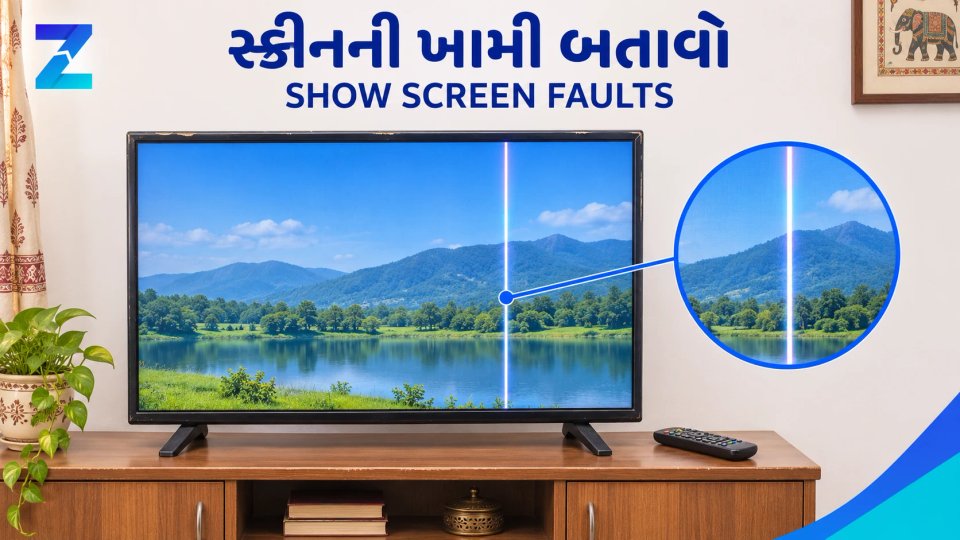
To sell an old TV, give its exact model, size, current condition, known repairs and included remote, stand or mount. Photograph screen faults honestly and agree what the buyer can test. Compare similar asking prices, prepare smart-TV and streaming-device accounts for a new owner, and settle packing, installer help and collection before the TV leaves.
An old TV can be easy to describe badly: “43 inch, good condition, urgent sale.” Someone interested still needs to know which model it is, what works and whether they can take it home without missing a stand or remote.
If you are selling a TV in Gujarat after an upgrade or a move, start with those details. A buyer can then decide whether to arrange a visit. You can post a TV ad on Zutilo with your photos, asking price and actual pickup area. Free posting is available within the current category allowances.
Find the exact model before writing the ad#
Check the model label or the TV’s own information screen. Copy the model correctly and give the screen size. Avoid showing your full serial number or account details in public photos. If it is wall-mounted, do not strain to reach behind it just to read a label; use an accessible source or suitable help.
Say whether it is a smart TV or a non-smart TV. A separate streaming stick does not turn the TV’s built-in system into Android TV. Describe the TV and the extra device separately, including which one the price covers.
- Brand, full model, screen size and purchase year or approximate age.
- Picture, sound, remote and the ports or smart functions you have actually checked.
- Screen lines, marks, cracks, startup problems, repairs and anything not tested recently.
- Remote, power cable, stand, screws, wall mount and any included streaming device.
- Bill or warranty evidence, if available, plus your asking price and pickup area.
If you only know that it switches on, say that. “All working” should not stand in for checking HDMI, sound or Wi-Fi. Do not promise that an app will keep working indefinitely or include your paid subscriptions in the offer.
Show the screen and the faults clearly#
Take a full front photo in good light, a safely connected powered-on view, and a closer photo of any screen fault. Add the back or accessible model label, remote and included stand or mount. Keep reflections, people, account names and private photos out of the screen.
A working picture in one photo does not show every fault. If a line appears after the TV has been running, or the sound cuts out sometimes, describe when it happens. Do not edit a crack or dark patch out of the image. The used-item photo guide can help with framing without hiding wear.
Agree a demonstration before the buyer travels. Show the picture, comfortable sound level, remote and the inputs you can test with suitable equipment. Ask whether they need to check a particular connection. For a fuller inspection, share the used TV buying checklist.
Do not power a TV with a damaged lead or known electrical fault to get a better selling photo. Describe the issue and seek suitable repair advice instead. A short demonstration is a chance to see the TV, not a guarantee about its remaining life.
Compare a similar TV before choosing a price#
Browse current used TV ads for the same model where possible. Otherwise compare size, features, age and condition together. Two 43-inch televisions can be very different offers. An advertised price is an asking price, not evidence of what a buyer paid.
Account for the remote, stand, known repairs and collection cost. A missing remote or a damaged panel needs a clear explanation. If you are also considering a shop or exchange offer, compare the final amount, deductions and collection terms rather than only the headline quote. Zutilo connects a lister with people who may enquire; it does not give an instant buyback price.
You can leave room for negotiation, but decide what that means before a visit. Use the second-hand pricing guide for the broader comparison method. Avoid applying a fixed percentage to the old purchase price.
Write a description that answers the first questions#
A useful title gives the model, size and an important inclusion or fault. For example: “[brand and model], 32-inch LED TV, remote and stand included.” If the screen is cracked, put that in the title rather than leaving it until the last line.
Here is an illustrative description to adapt, not a real offer: “Selling my [model] [size] TV. Picture and sound: [what you checked and any issue]. HDMI/Wi-Fi: [checked or not checked]. Included: [remote, stand and other parts]. Repairs: [known history]. Pickup: [your actual area]. Asking ₹[amount], [fixed or open to negotiation]. Buyer can inspect by arrangement.”
Use your own observations in every space. If a repair has not been diagnosed, describe the symptom rather than calling it a cheap fix. A non-working or damaged TV can be listed clearly for repair or parts; there is no guaranteed buyer or price.
Finish the account preparation before the TV leaves#
Plan the demonstration and reset in advance. Keep private photos and accounts off the screen during the visit. Before handing over a smart TV, follow the maker’s instructions for removing your accounts, saved network details and personal information, and resetting it for its next owner. Simply switching it off and on is not the same as a factory reset.
Check an included streaming stick or box separately: it may have its own account and reset process. Do not share your password so the buyer can keep using your subscription. If the TV cannot be reset, resolve the data/account issue before giving it away; use the maker’s help for the exact model rather than guessing at a menu.
Agree how the screen will come down and leave the room#
List exactly which mounting parts come with the TV. A wall mount, a table stand and the screws for each are different things. Keep the right parts together in a labelled bag. If the TV is currently on the wall, agree who will arrange suitable installer help to remove it safely.
Measure the TV’s outside dimensions as well as the route through doors, stairs and lifts. The advertised screen size alone does not tell someone whether their car or packaging will fit. Do not promise that a large TV will fit just because the seats fold down.
Agree packaging, loading, transport and any costs before collection. Follow the model’s handling guidance and avoid pressure on the screen. The original box and supports can help if complete and sound; an old box without its supports is not automatically suitable packing.
For a home visit, choose a sensible time and keep someone informed or present. Check payment in your own bank or UPI app before the TV leaves; a screenshot from the buyer is not enough. Read the Zutilo safety guidance if a payment request seems unusual.
When your details and collection plan are ready, put the ad up with clear photos. Answer questions about the actual TV, and mark it sold after collection so the next person sees the right availability.
Looking to sell something?
Reach local buyers with clear photos, condition, price and location. Free posting is available within category allowances; any applicable charge appears during posting.
Sell My Old TVBrowse related listings
Quick shortcutsFrequently Asked Questions
4 questionsDescribe it as non-working or for repair, and give the symptoms you observed. Do not call a cracked screen or power fault a minor repair without a diagnosis.
After demonstration, follow the maker’s instructions to sign out of accounts and reset it for the new owner. Check included streaming devices separately and do not transfer your passwords or subscriptions.
Compare the same model or similar size, features and condition. Account for missing accessories, faults and collection. Advertised asking prices are not verified sale prices.
Agree this before payment and loading. Follow the maker’s handling instructions, keep stand and mount parts together and use suitable installer or moving help where needed.